







In this article, you will learn everything about how to account for promotions on Slevomat and Zľavomat. We will show you how to proceed correctly when accounting from the moment you sign a contract with us until the end of the validity of vouchers from a given promotion. Everything is also clearly described in our video guide
Furthermore, we will explain the issue of issuing documents for customers, who may require them, and we will also focus on the possibility that we could issue documents on your behalf. Lastly, the article describes the specifics of accounting for promotions in the Goods category.
We also recommend looking at the most frequently asked questions about settlements.
Guide to Accounting for Promotions
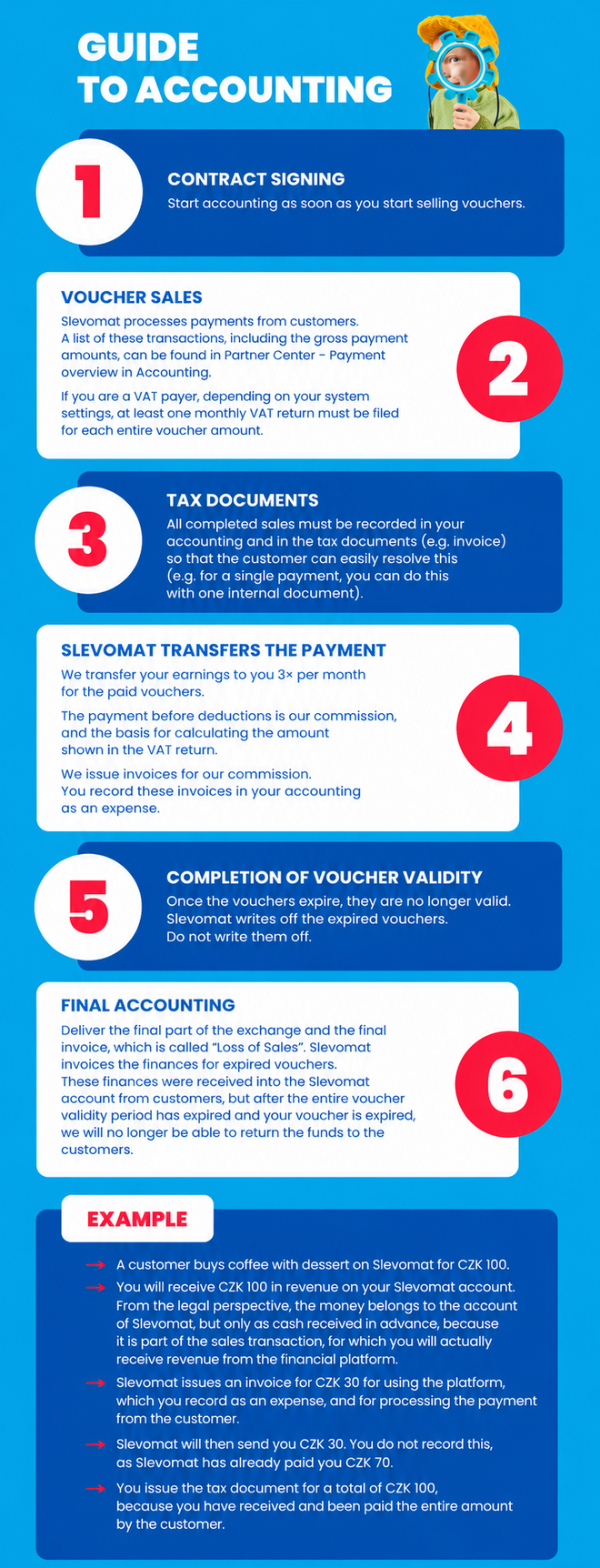
The principle of accounting for promotions is simply explained in the infographic below.
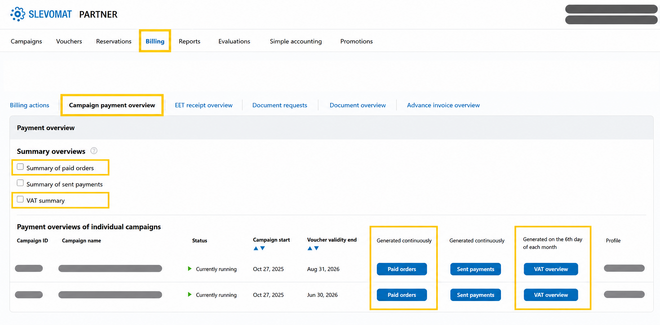
You receive the money as soon as the order is paid. The money is stored in our bank account, which you rent as part of the lease of the business platform. However, the funds are yours from the beginning. In your interface, you have access to download overviews of these payments for the purpose of issuing tax documents to customers and VAT remittance. To download, simply click in your partner interface on the Settlement – Overview of Promotion Payments section, where you just select the given promotion and click the Paid Orders or VAT Overview button.
The Paid Orders file may appear very extensive at first glance. Therefore, we have also prepared a sample file with a detailed description of each column. You can download this file HERE
Inclusion of the voucher in the settlement
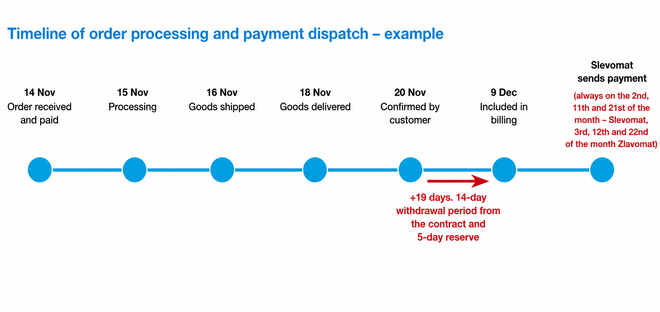
The total revenue (reduced by commission and the value of unused vouchers) is paid out gradually according to the date the voucher is redeemed. Redeemed vouchers are included in the settlement 3× a month: on the 1st, 10th, and 20th day of the month. For services and travel, settlement is based on voucher redemption in the interface. For offers for a specific date (e.g., accommodation or cultural events), the voucher is redeemed automatically.
Settlement documents
All documents are available in your partner interface in the Settlement section. The basic document is the Settlement file in PDF format.
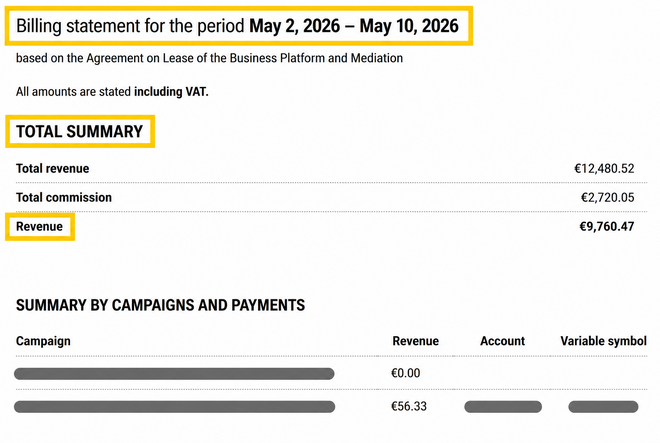
- In the same document, you also have a breakdown of the settlement by individual promotions. This allows you to better check the number of redeemed vouchers and the amount of commission.
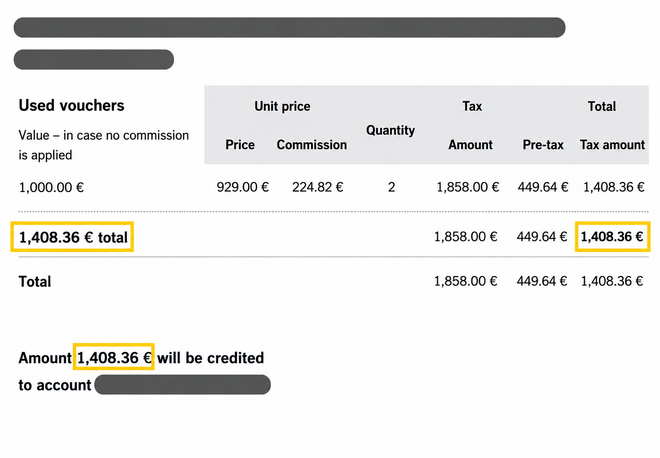
Settlement breakdown for a specific promotion
-
Another file you receive with each settlement is our commission invoice, which is always offset with redeemed vouchers (or with unused vouchers after the end of the validity of vouchers from the given promotion).
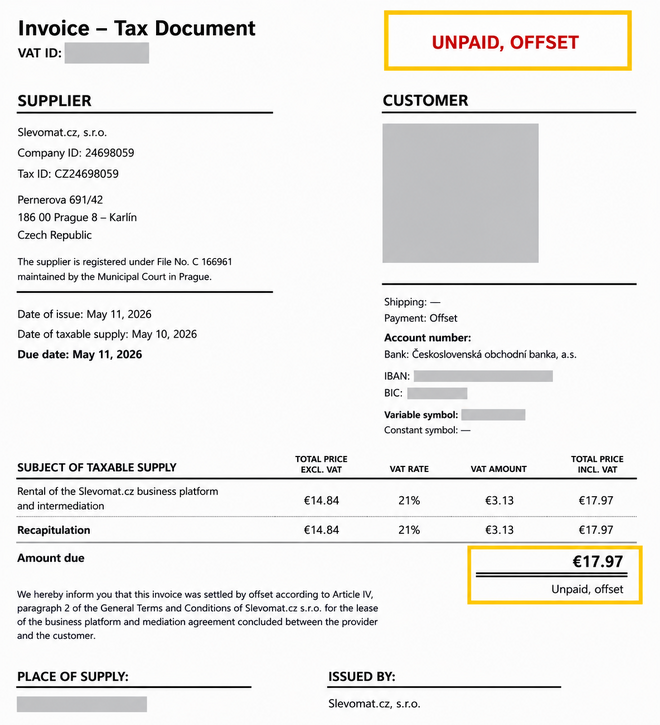
-
The last file is the Overview of Settled Vouchers.
Money for redeemed vouchers and goods is sent from our account 3× a month. On Slevomat, money is sent on the 2nd, 11th, and 21st day of the month. On Zľavomat, money is sent on the 3rd, 12th, and 22nd day of the month. If this date falls on a public holiday, the money is sent on the next working day.
An overview of all payments sent for a given promotion can be obtained in the Settlement – Overview of Promotion Payments section, or in the detail of the given promotion.
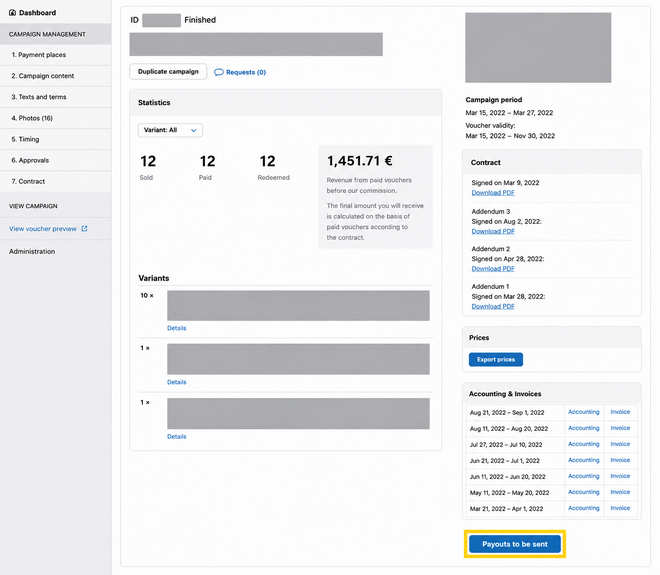
Unused vouchers
100% of the value of unused vouchers belongs to Slevomat/Zľavomat (therefore, the amount for them must also appear on our final commission invoice). Thus, an unused voucher is initially income for you (you receive the funds in our account), and if the customer does not show up, it appears on the invoice and becomes an expense for you. The amounts are offset against each other. If you are a VAT payer, you pay tax on the full amount of the voucher at the time of its sale. However, our commission invoice represents a tax-deductible expense for you, thanks to which you can claim the VAT back in your return. Unused vouchers are marked on the invoice and in the contract as Provider's Share of Unused Vouchers.
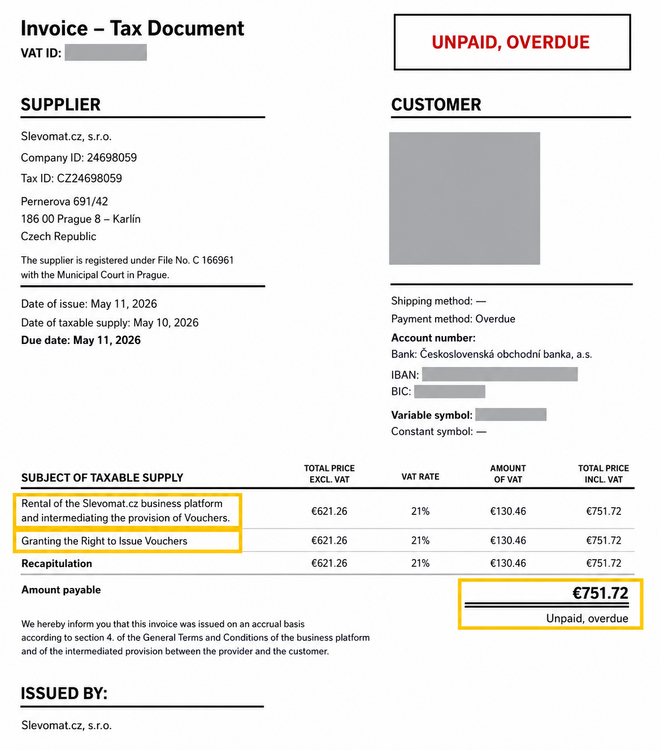
If you offer a service at a different VAT rate than the basic one, in the case of unused vouchers, you need to issue corrective tax documents for unused vouchers listed on the final commission invoice and request a VAT refund from the tax office, as the service was not provided.
Control statement/report
The company Slevomat.cz, including its organizational unit Slevomat.cz, s.r.o.- organizačná zložka Slovakia (Zľavomat), is not the buyer in individual orders. Therefore, include it in the control statement/report only in connection with our issued commission invoice to your company. For commission invoices, state their numbers.
Date of taxable supply (DUZP) for invoices issued to customers
If it is a single-purpose voucher from the perspective of the VAT Act, then always the date of receipt of payment to the account, i.e., at the moment when the customer paid to the Slevomat account. You can find the date in the Paid Orders overview.
Illustrative guide for your accountants in PDF file
Issuing Documents
Slevomat/Zľavomat is only an intermediary, so it cannot issue tax documents for end customers. You, as the service provider with whom the customer concludes the purchase contract, must issue the documents/invoices. It is also not possible for you to issue an invoice in our name.
Issuing a document for customers
You receive the money as soon as the order is paid, and therefore you are also obliged to pay value-added tax at this moment. (Tax) documents are therefore issued at the time of the customer's payment.
In your interface, you have access to download overviews of all received payments for the purpose of issuing tax documents to customers and VAT remittance. You can find them in the Settlement – Overview of Promotion Payments tab. By pressing the blue Paid Orders button, you will download a list of all paid and canceled orders for the entire promotion to your computer. Similarly, you can download the VAT Overview, which contains sales data for individual months. You can also export summarized overviews for multiple promotions at once.
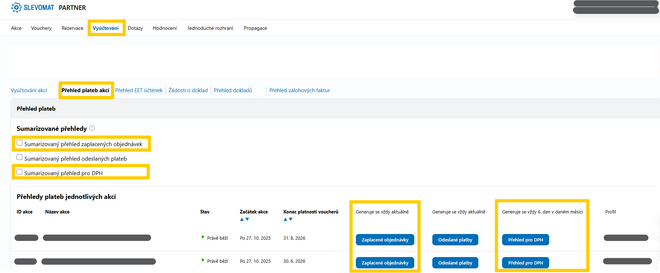
The key identifier is the order number, under which you then have an overview of when you received the payment and then when the voucher from the given order was redeemed and included in the settlement.
In the case of a purchase for a company, we will immediately send you an email notification regarding the customer's request for a tax document for the given order. You can find a list of all these requests in the Settlement – Document Requests section.
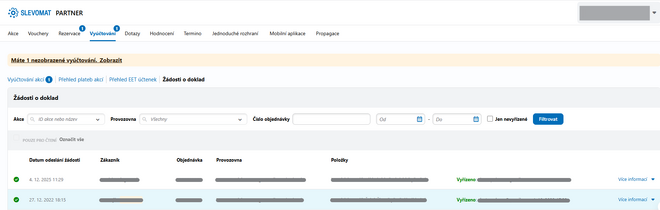
For each request, you can always view the necessary information for issuing a tax document and then mark the request as processed.

As for the form of the invoice for the customer, most partners issue an invoice for the customer stating "Total in CZK/EUR" (total voucher price) and in the line below state "Total to be paid 0.00 CZK/EUR" with a note that it was paid via Slevomat, or that it was paid by voucher.
Usually, the note also includes the order number so that the document can be more easily traced.
What about the document for customers for unused vouchers
After creating a tax document for the customer, the given amount will appear in your accounting as income. If the voucher is not used by the customer, the unused voucher will be reflected on the final commission invoice as Provider's Share of Unused Vouchers. Because of this, it becomes an expense for you. This means that the unused voucher on the commission invoice is offset against the tax document you issued.
The tax document/invoice must be issued for the full amount paid by the customer.
If you issue a tax document/invoice for the amount without commission, according to the General Terms and Conditions you signed, this would constitute disclosure of a trade secret (the amount of the commission) to a third party.
As part of the financial settlement between us and you, we send you your revenue – that is, the voucher price minus our commission. We issue you a commission invoice for this commission. Don't worry, it won't cause any problems in your accounting.
Proforma invoices
A proforma invoice is not a tax document, it is only a prepayment invoice and does not fall under accounting. A proforma invoice usually contains all the prescribed elements of a regular tax document. However, the data is for informational purposes only and serves as a basis for payment. The customer most often needs a proforma invoice for their employer, for example, if they are purchasing a stay through FKSP (Slevomat).
Since the customer concludes the purchase contract with you, you must issue the invoice with your company ID and other details. However, since the customer orders on Slevomat.cz, provide our payment details. As the account number, state 238400856/0300 (ČSOB), the variable symbol is obtained from the customer, who knows it from their order. For orders on Zlavomat.sk, state 4012352749/7500 (ČSOB), account number in IBAN format: SK8775000000004012352749.
Power of Attorney for Issuing Documents
We can issue documents (including prepayment invoices for FKSP orders – Slevomat only) on your behalf. However, we need your power of attorney to issue documents. Then we can issue documents directly to customers on your behalf.
This option is currently not available for the Goods category.
Why allow us to issue documents?
-
we will save you time and you will always have the documents available for download for import into your accounting system
-
we will help you keep order and an overview of documents for services offered on our business platform
-
the customer will have the documents available for download in their profile immediately after payment, saving you often lengthy communication with them
What needs to be done?
It is necessary that you account for documents and prepayment invoices issued by us at the time of sale.
If you already account this way, everything is fine and we can sign the power of attorney for issuing tax documents.
If you account at a different stage – for example, when you receive money from us in your account, it is necessary that after signing the power of attorney, you start accounting at the time of sale (when the customer purchases the voucher). Tax documents issued by Slevomat/Zľavomat will have DUZP (date of taxable supply) determined by the date of payment of the order (applies to single-purpose vouchers). For documents issued by Zľavomat, the tax liability will be determined by the date of payment of the order. Likewise, the date of issue will normally be at the time of payment by the customer.
And then sign the power of attorney with us, about which you can find more information Error: The supplied content is not in Czech language..
With us, you can choose from the following power of attorney options:
For accommodation offers (Travel category):
-
Prepayment invoices and documents, only for FKSP purchases (Slevomat only)
-
we will issue both a prepayment invoice and a document after payment for the order is received
-
Documents for orders outside FKSP
-
when purchasing for a company, order over 10,000 CZK (Slevomat) / 400 € (Zľavomat), or if the customer requests a document
-
Prepayment invoices and documents for orders both outside and within FKSP (FKSP only for Slevomat)
-
if, in addition to accommodation, you also offer local services on Slevomat under one profile, documents outside FKSP will also be generated for orders from local service promotions
For local service offers:
-
Documents for orders outside FKSP
-
when purchasing for a company, order over 10,000 CZK (Slevomat) / 400 € (Zľavomat), or if the customer requests a document
For documents, we will generate a new numbering series for you, which you can easily add to your accounting by setting up a new numbering series.
The numbering series is structured as follows:
-
the first two digits indicate the year the document was issued (for example, '26' for the year 2026)
-
the third digit indicates the type of document
-
digit '1' indicates a document for a paid order
-
digit '2' indicates a document for payment of a reservation deposit
-
digit '3' indicates a prepayment invoice
-
digit '6' indicates a document for a surcharge when changing a reservation (e.g., additional extension of stay)
-
digit '9' then indicates a credit note
-
the remaining numbers are determined by the order of issuance of the document in the given year and type
-
e.g., the second prepayment invoice issued in 2026 would have the number 26300002
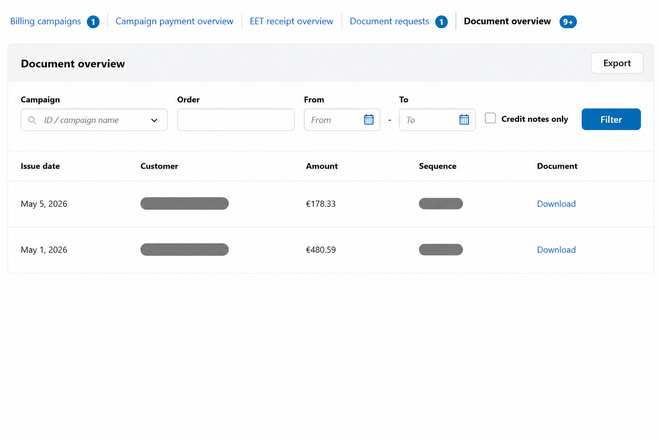
You will find the generated documents clearly in the Settlement tab. Here you will see their list, you can download individual documents or export them in bulk in CSV format.
Goods
Settlement in this category works similarly to others. However, there are a few differences we would like to point out.
-
For an order to be included in the settlement, it must be switched to the Received and Confirmed by Customer status. Therefore, it is very important to change each order to Delivered status. It is not enough to set "Sent" or "Ready for Pickup".
-
Orders are included in the regular settlement 19 days after they have been marked as received by the customer. The 19-day period includes the 14 days during which the customer can withdraw from the contract and return the goods, and a 5-day reserve. Along with the payment for the product, we also send you the payment for postage. We do not charge a commission on this.
-
In the "Goods Orders" section, after clicking the "More Filters" button, you will find the "Settlement Month and Day" filter. This filter allows you to find out which settlement the given orders were or will be included in.
-
You, as the supplier, continue to issue invoices to customers. This is for the full value of the order, including commission and including postage. You state the price paid by the customer.
If you did not find the answer to your question here or have another comment, do not hesitate to contact us at partneri@slevomat.cz/ombudsman@zlavomat.sk or at tel. +420 776 673 831/+421 948 977 898.
